Using template in Music API
In this tutorial, we'll go over the necessary steps to use the templating feature of Music API and get the data you need.
Prerequisites
Before you begin, make sure you have:
- The authentication credentials required to access the API.
- Familiarity with HTTP methods and response codes.
Templating in Music API
Endpoint Overview
The API provides multiple /templating endpoints that allow you to retrieve an entire template, a tab or a section:
GET /api/v2/templating/homepageGET /api/v2/templating/homepage/tab/{tabId}GET /api/v2/templating/homepage/tab/{tabId}/section/{sectionId}
What is a template
A template is used to show data driven content to the user dynamically.
Its main purpose is to speed up development and application changes by providing a quick way of delivering various assets coming from Music API.
The templating API also included any assets that the user has in their favorite or history list.
A typical template is made out of multiple tab objects in an array as such:
{
  "tabs": [
    {
    "id": "classical",
    "label": "CLASSICAL",
    "sections": [
      {
        "id": "recommended",
        "label": "Recommended Classical",
        "type": "SWIMLANE",
        "size": 7,
        "offset": 0,
        "total": 7,
        "cacheable": true,
        "items": [
          {
            "id": "VIB_N1035",
            "label": "Relaxing Classical Hits",
            "type": "STATION",
            "coverUrl": "https://...",
            "link": "https://..."
          },
          ...
        ]
      },
      ...
    ]
    },
    ...
  ]
}
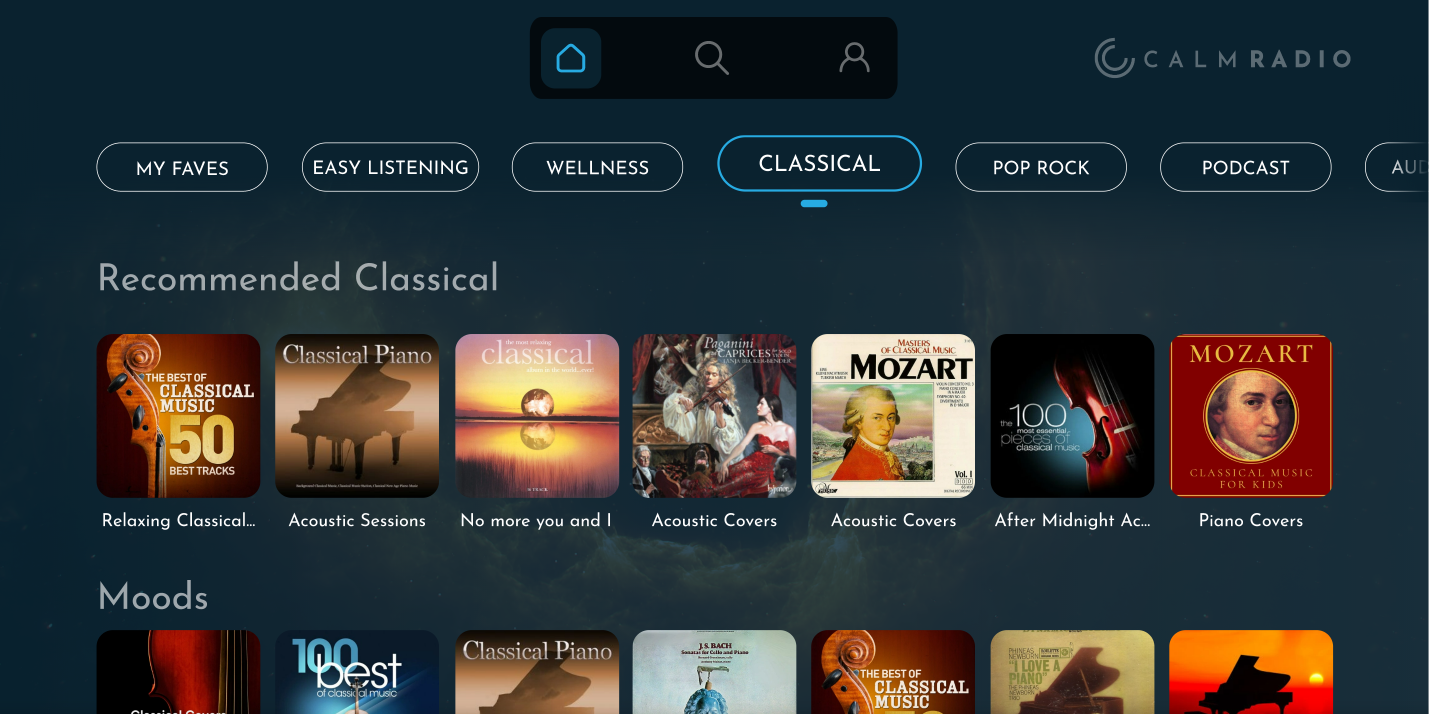
Each tab contains an id, label and sections that themselves contains the assets to display.
To further illustrate, a tab consists of the sections of the following screen:
Retrieving a template
To retrieve a template, make a GET request to /templating/homepage. Here's an example using curl:
curl -X GET "https://music-service.stingray.com/api/v2/templating/homepage" -H "Authorization: Bearer YOUR_JWT"
This will return a template with all the available tabs.
Retrieving a specific tab
If you need a tab in particular, you can retrieve it by doing a GET request to /templating/homepage/tab/{id} as shown in the following example:
curl -X GET "https://music-service.stingray.com/api/v2/templating/homepage/tab/HOT" -H "Authorization: Bearer YOUR_JWT"
What is a section
A section represents a container of object inside a tab.
Each section should be displayed one after the other in the format defined by the type parameter.
Here's an example of a section:
{
  "items": [...],
  "size": 7,
  "offset": 0,
  "total": 7,
  "id": "pop",
  "label": "pop",
  "type": "SWIMLANE",
  "cacheable": true
}
The parameter type indicates how each object coming from items should be formatted.
The type SWIMLANE shown in this example means the preferred way of organising the data would be in a linear way to the user.
As of right now,
SWIMLANEis the only supportedtype.
A section that's cacheable means the response can be kept in cache for a reasonable amount of time. Thus, a section that's not cacheable should be fetched from the API every time it is displayed to the user.
Items
An item is an abstraction of the various assets obtainable by the API. The items should be displayed inside a section and the type of item should dictate the application's behavior.
Here's an example of an item:
{
  "id": "VIB_N1035",
  "label": "All-Time Greatest Hits",
  "type": "STATION",
  "coverUrl": "https://...",
  "link": "https://..."
}
type describes which asset is being delivered, meaning it can be one of these values:
STATIONEPISODEPODCASTAUDIOBOOK
Retrieving a section
The previous example was fetched by performing a GET request to the /api/v2/templating/homepage/tab/{tabId}/section/{sectionId} endpoint. Here's how it was done using curl:
curl -X GET "https://music-service.stingray.com/api/v2/templating/homepage/tab/HOT/section/pop" -H "Authorization: Bearer YOUR_JWT"
Pagination
The API supports pagination to help manage large sets of items. This can be useful if a user wants to see more items than what is usually shown by default in a section.
You can use the limit and offset parameters to control the pagination with the query parameters limit and offset:
curl -X GET "https://music-service.stingray.com/api/v2/templating/homepage/tab/HOT/section/pop?limit=10&offset=0" -H "Authorization: Bearer YOUR_JWT"
Localisation
Each endpoint supports a variety of languages for its data. Localisation is managed through the headers by adding accept-language, here's an example using /api/v2/templating/homepage:
curl -X GET "https://music-service.stingray.com/api/v2/templating/homepage" -H "Authorization: Bearer YOUR_JWT" -H "accept-language: es"
For a list of supported languages, check out the official localisation documentation.